Features
Pasteliterate
Pasteliterate is a feature of Aksharamala that allows you to do
on-the-fly conversion from the source format into the target language.
The following is a step-by-step way to do the conversion:
- Select and copy the text into clipboard. (by pressing Ctrl+C or
Edit/Copy)
- Bring into focus the application which needs to receive the
converted text.
- Enable Aksharamala.
- Select the appropraite keymap (say "Shusha Reversliteration" if
you are converting Shusha text to ITRANS)
- Press the hotkey for Pasteliterate (Ctrl+Shift+I) to achieve the
conversion!
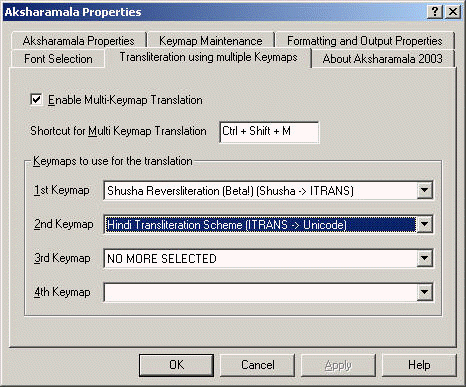
Transliteration using Multiple Keymaps
This feature allows conversion of data from one format to another
using multiple keymaps. Here is how to use the feature:
- Right click on Aksharamala and select Options.
- Select "Transliteration using Multiple Keymaps" page.
- Select the 1st Keymap (the source data will be first processed by
this keymap)
- Select the 2nd Keymap (resulting data from above will be fed to
this keymap)
- Select any more keymaps as necessary.
- Select "Enable Multi-Keymap Translation" check box.
- Select and copy the text.
- Press the hotkey (Ctrl+Shift+M) to do the conversion!